Developer Guides
What Are Containerization and Docker? A Practical Guide
Learn the basics of containerization and Docker, including containers, images, Dockerfiles, Docker Compose, volumes, networks, registries, security, scanning, SBOMs, and a practical rollout roadmap.
💡Key Takeaways
- Learn the basics of containerization and Docker, including containers, images, Dockerfiles, Docker Compose, volumes, networks, registries, security, scanning, SBOMs, and a practical rollout roadmap.
What Are Containerization and Docker? A Practical Guide to Containers, Images, Dockerfiles, Compose and Security
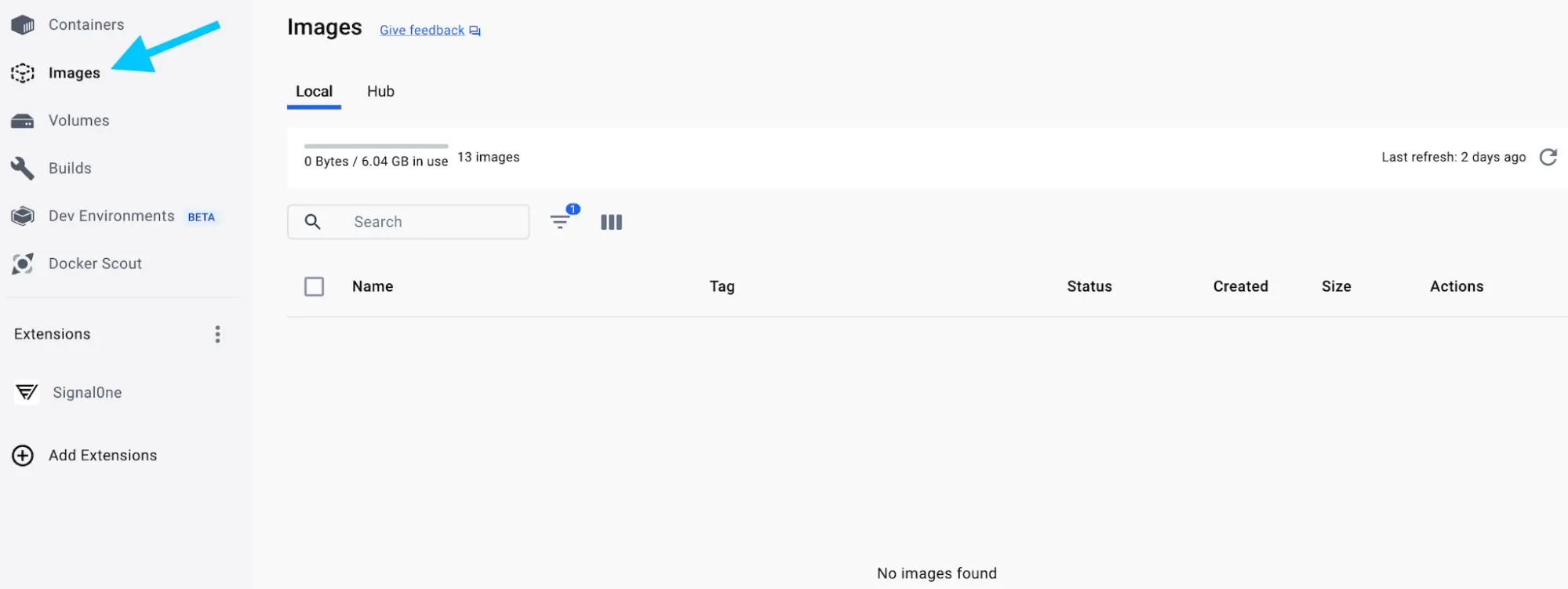
Image was checked before being inserted into this Markdown file. Extracted from Docker Docs, WebP file, not SVG.1
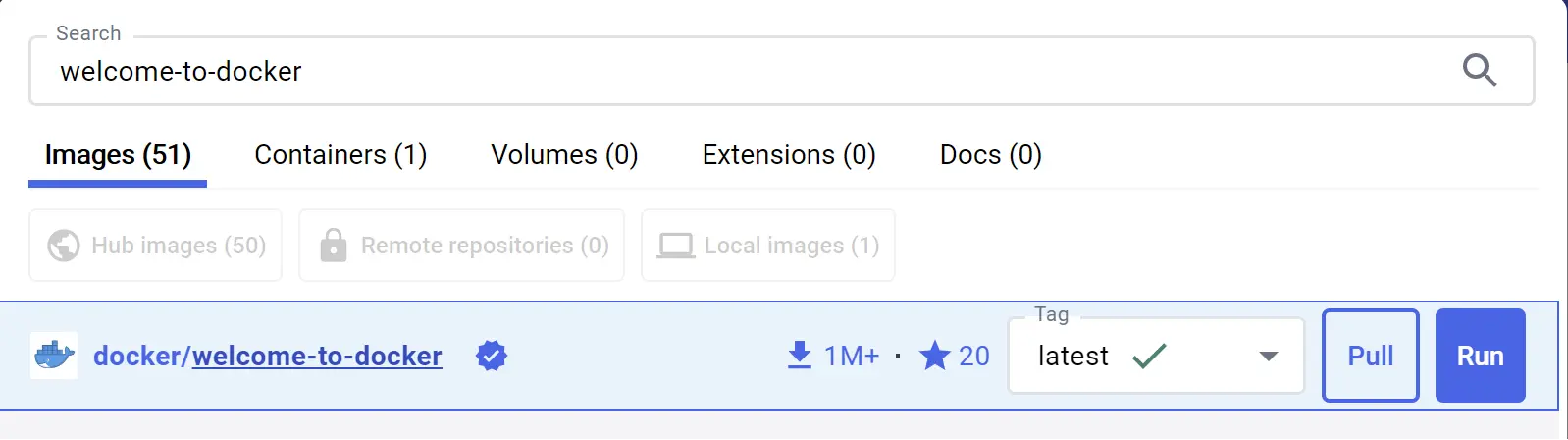
Image was checked before being inserted into this Markdown file. Extracted from Docker Docs, WebP file, not SVG.2
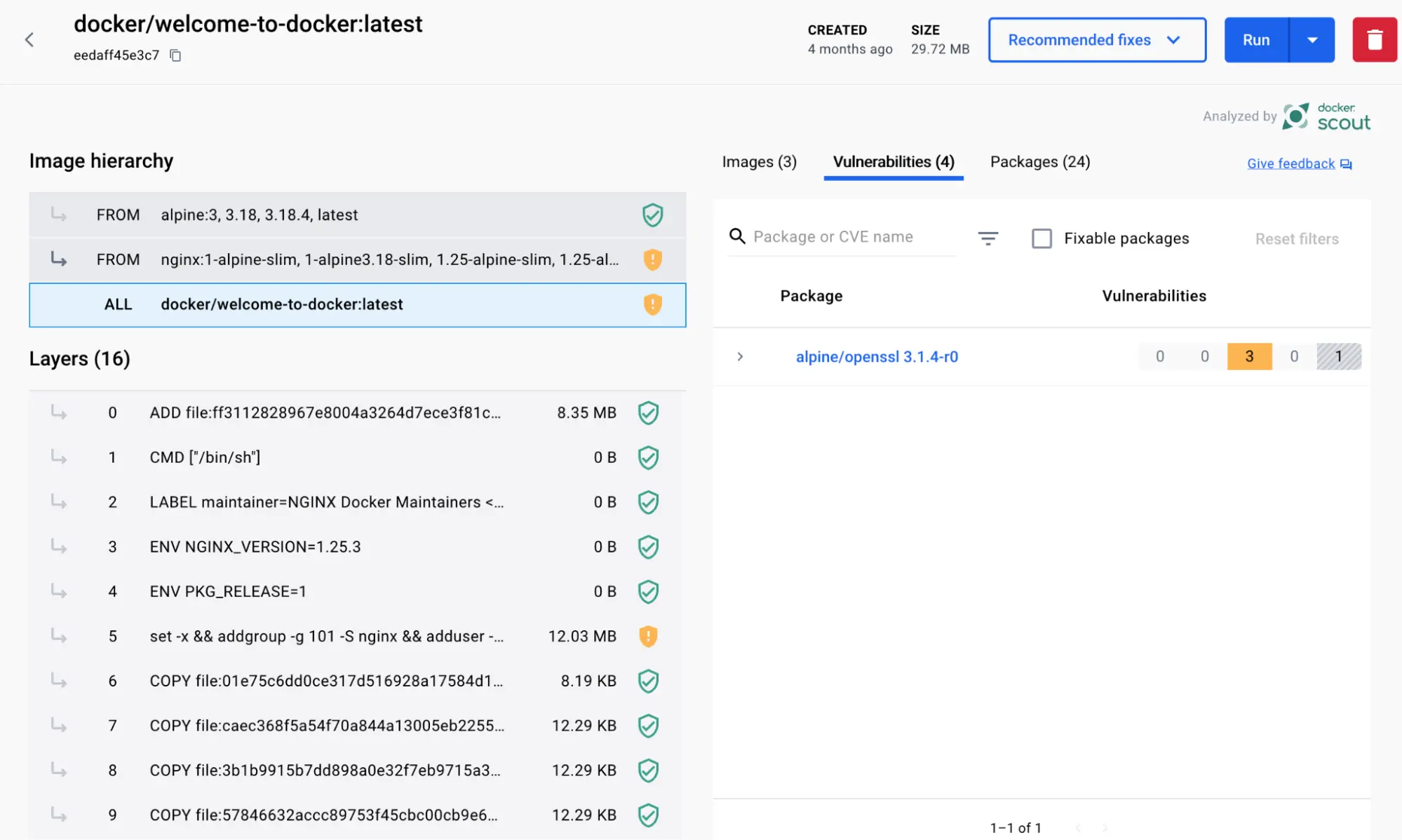
Image was checked before being inserted into this Markdown file. Extracted from Docker Docs, WebP file, not SVG.3
Quick summary
Containerization packages an application with its dependencies, runtime, libraries and configuration into an isolated runtime unit called a container. Containers help applications run more consistently across developer machines, CI/CD, staging and production.
Docker is a common toolset for building, distributing and running containers. Docker Docs describes a container image as a standardized package containing all files, binaries, libraries and configuration needed to run a container. Docker also emphasizes that images are immutable and composed of layers.4
Simple flow:
Source code + dependencies + runtime
  ↓ Dockerfile
Docker image
  ↓ docker run
Running container
Docker does not replace Kubernetes, VMs or CI/CD. Docker packages and runs applications; Kubernetes usually orchestrates containers at cluster scale.
What problem do containers solve?
Before containers, teams often faced “works on my machine” problems:
Developer machine: Node 20, library A 1.2, config X
Staging: Node 18, library A 1.1, config Y
Production: missing system package, runtime failure
Containers standardize runtime environments:
App
  + runtime
  + dependencies
  + default config
  + filesystem layers
        ↓
Container image
        ↓
More consistent execution across environments
Benefits:
- less dev/staging/prod drift;
- faster deployments;
- easier rollback;
- easier service scaling;
- explicit dependencies;
- CI/CD-friendly packaging;
- good fit for microservices;
- local multi-service stacks with Docker Compose.
What Docker is not
| Docker is | Docker is not |
|---|---|
| A tool to build and run containers | A full orchestrator like Kubernetes |
| A way to package apps and dependencies | Automatic security |
| Images, containers, registries, volumes and networks | A database backup solution |
| Useful for local development and CI/CD | Mandatory for every app |
| Dockerfile and Compose workflows | Only for microservices |
| Works across Linux, Windows and macOS workflows | A full VM with a separate kernel per app |
Containers share the host kernel. They are lighter than VMs, but isolation is different from VMs. Untrusted workloads require stronger hardening or sandbox runtimes.
Container, Image, Dockerfile and Registry
| Concept | Meaning |
|---|---|
| Image | immutable template containing filesystem and metadata for containers |
| Container | running instance of an image |
| Dockerfile | build instructions for an image |
| Registry | storage and distribution system for images |
| Layer | filesystem change created during image build |
| Volume | persistent data storage outside container lifecycle |
| Network | communication mechanism for containers |
| Compose | YAML-based multi-container app definition tool |
Docker Docs describes a container as an isolated process and an image as the package that creates that container.54
What are image layers?
A Docker image contains multiple layers. Each layer represents filesystem changes created by a Dockerfile instruction.
Example:
FROM node:22-alpine
WORKDIR /app
COPY package*.json ./
RUN npm ci --omit=dev
COPY . .
CMD ["node", "server.js"]
Instructions such as RUN, COPY and ADD can create layers. Docker uses layer caching to speed up builds.
Practical rules:
- copy dependency manifests before installing dependencies;
- copy source code later to improve cache reuse;
- reduce build context using
.dockerignore; - never put secrets into image layers;
- use multi-stage builds to reduce runtime image size.
Basic Dockerfile
Node.js API example:
FROM node:22-alpine

WORKDIR /app

COPY package*.json ./
RUN npm ci --omit=dev

COPY . .

USER node

EXPOSE 3000

CMD ["node", "server.js"]
Explanation:
| Instruction | Role |
|---|---|
FROM | base image |
WORKDIR | working directory |
COPY | copy files into image |
RUN | run build-time commands |
USER | run as non-root user |
EXPOSE | document application port |
CMD | default command at runtime |
A Dockerfile should be clear, minimal, free of secrets and non-root where possible.
.dockerignore matters
.dockerignore excludes files from the build context.
Example:
node_modules
.git
.env
*.log
coverage
dist
tmp
.DS_Store
Without .dockerignore, Docker may send .git, node_modules, logs or secret files into the build context. That slows builds and can leak data.
Multi-stage builds
Multi-stage builds separate build and runtime environments. Docker has dedicated documentation for multi-stage builds.6
Go example:
FROM golang:1.23-alpine AS builder
WORKDIR /src
COPY go.mod go.sum ./
RUN go mod download
COPY . .
RUN go build -o /out/app ./cmd/api

FROM alpine:3.20
RUN adduser -D appuser
USER appuser
COPY --from=builder /out/app /app
ENTRYPOINT ["/app"]
Benefits:
- smaller runtime images;
- no compilers/build tools in production images;
- reduced attack surface;
- clearer build flow;
- easier scanning.
What is Docker Compose?
Docker Compose uses a YAML file to define and run multiple containers together. Docker Docs describes Compose as a tool for defining and running multi-container Docker applications.7
Example:
services:
  api:
    build: .
    ports:
      - "3000:3000"
    environment:
      DATABASE_URL: postgres://app:pass@db:5432/app
    depends_on:
      - db

  db:
    image: postgres:16-alpine
    volumes:
      - pgdata:/var/lib/postgresql/data
    environment:
      POSTGRES_USER: app
      POSTGRES_PASSWORD: pass
      POSTGRES_DB: app

volumes:
  pgdata:
Use Compose for:
- local development stacks;
- demos;
- integration testing;
- small single-server apps;
- dependency simulation.
Compose is not a full replacement for Kubernetes when you need rolling updates, autoscaling, multi-node scheduling, strong self-healing or large-scale policy control.
Volumes: do not store databases in container layers
Container filesystems may disappear when containers are recreated. Use volumes for persistent data.
Example:
docker volume create pgdata

docker run -d \
  --name postgres \
  -v pgdata:/var/lib/postgresql/data \
  -e POSTGRES_PASSWORD=secret \
  postgres:16-alpine
Rules:
- databases use volumes;
- uploaded files use volumes or object storage;
- back up volumes;
- do not assume container layers are persistent;
- protect sensitive data stored in volumes.
Docker networking
Containers can communicate through Docker networks.
Example:
docker network create appnet

docker run -d --name db --network appnet postgres:16-alpine
docker run -d --name api --network appnet -p 3000:3000 my-api:latest
Inside the same network, api can call db using hostname db.
Notes:
- publish only required ports;
- local databases do not need to bind to
0.0.0.0; - separate networks for sensitive services;
- use firewall/security groups in cloud/server environments;
- in Kubernetes, use NetworkPolicy.
Registries and tags
A registry stores images. Docker Hub is common, but production often uses private registries.
Tag examples:
myapp:latest
myapp:1.4.2
myapp:2026-06-05-a1b2c3
myapp@sha256:...
Recommendations:
- avoid
latestin production; - use versions or Git SHAs;
- pin digests for critical environments;
- scan images before push/promotion;
- control registry access;
- apply retention policies;
- sign images where supply chain integrity matters.
Docker Security principles
Docker Docs has a dedicated Docker Engine security section.8 Practical controls include:
1. Avoid root where possible
RUN adduser -D appuser
USER appuser
2. Drop capabilities
docker run --cap-drop=ALL --cap-add=NET_BIND_SERVICE myapp
3. Use read-only filesystem
docker run --read-only myapp
If temporary writes are needed:
docker run --read-only --tmpfs /tmp myapp
4. Limit resources
docker run --memory=512m --cpus=1.0 myapp
5. Do not mount the Docker socket
Dangerous:
-v /var/run/docker.sock:/var/run/docker.sock
A container with Docker socket access can often control the host Docker daemon.
6. Avoid privileged containers
Avoid:
docker run --privileged ...
Use only when the risk is understood and justified.
Image security
Checklist:
- trusted base images;
- small base images where appropriate;
- regular base image updates;
- CVE scanning with Docker Scout, Trivy or Grype;
- no secrets in image layers;
.dockerignore;- multi-stage builds;
- non-root user;
- version pinning;
- Cosign signing where needed;
- SBOM generation with Syft or suitable Docker tooling;
- no unscanned images in production.
Docker Scout analyzes images, dependencies, CVEs and policies.9
Secrets in Docker
Do not put secrets in Dockerfiles:
ENV API_KEY=secret
RUN echo "password=secret" > /app/config
They can remain in image history or layers.
Better approaches:
- secret manager;
- runtime secret injection;
- Docker/Compose secrets where suitable;
- cloud secret manager in production;
- no secret logging;
- secret rotation;
- repo and image secret scanning.
Compose secrets example:
services:
  api:
    image: my-api
    secrets:
      - db_password

secrets:
  db_password:
    file: ./db_password.txt
Docker vs Kubernetes
| Criteria | Docker | Kubernetes |
|---|---|---|
| Main role | build/run containers, local dev, image workflow | orchestrate containers across clusters |
| Scale | single machine or build/dev workflow | multiple nodes and workloads |
| Config | Dockerfile, Compose | YAML resources, Helm, Kustomize |
| Networking | Docker network | Service, Ingress, NetworkPolicy |
| Storage | Docker volume | PersistentVolume/PVC/StorageClass |
| Rollout | manual/simple Compose | rolling update, rollback, probes |
| Self-healing | limited | stronger |
| Autoscaling | not primary focus | HPA/VPA/Cluster Autoscaler |
Docker is commonly used for local build/run workflows; Kubernetes is for production orchestration at scale.
Docker vs Podman
| Criteria | Docker | Podman |
|---|---|---|
| Daemon | uses dockerd | daemonless design |
| Rootless | supported | strong rootless workflow |
| CLI | docker | podman, many Docker-compatible commands |
| Compose | Docker Compose is popular | podman-compose / Quadlet / systemd workflows |
| Kubernetes YAML | not primary focus | some pod/K8s-related support |
| Ecosystem | very broad | strong in Linux/RHEL/Fedora environments |
Choose Docker for broad ecosystem and onboarding. Choose Podman for rootless Linux workflows and certain enterprise Linux environments.
CI/CD with Docker
Common pipeline:
Commit
  ↓
Run tests
  ↓
Build image
  ↓
Scan image
  ↓
Generate SBOM
  ↓
Sign image
  ↓
Push registry
  ↓
Deploy staging
  ↓
Promote production
Build and push:
docker build -t registry.example.com/myapp:2026-06-05-a1b2c3 .
docker push registry.example.com/myapp:2026-06-05-a1b2c3
Production images should usually be built in CI/CD, not on a developer laptop.
Dockerfile best practices
Docker has dedicated documentation for build best practices.10
Checklist:
- trusted base image;
- version pinning;
.dockerignore;- cache-aware Dockerfile ordering;
- multi-stage builds;
- no unnecessary packages;
- non-root runtime user;
- no copied secrets;
- prefer
COPYoverADDunless needed; - clean package manager caches where relevant;
- expose the correct port;
- healthcheck where appropriate;
- scan images.
Better Node.js example:
FROM node:22-alpine AS deps
WORKDIR /app
COPY package*.json ./
RUN npm ci --omit=dev

FROM node:22-alpine AS runtime
WORKDIR /app
ENV NODE_ENV=production
COPY --from=deps /app/node_modules ./node_modules
COPY . .
USER node
CMD ["node", "server.js"]
Container observability
Track:
- restart count;
- CPU/memory;
- network I/O;
- disk usage;
- application logs;
- healthchecks;
- latency/error rate;
- image version;
- exit code;
- OOMKilled;
- dependency status.
Production needs log aggregation, metrics, tracing and alerts. docker ps is not enough.
30/60/90-day rollout roadmap
Days 1–30: local development baseline
- Write Dockerfile for one app.
- Add
.dockerignore. - Create Compose for app + database.
- Run tests in containers.
- Avoid root where possible.
- Do not put secrets in images.
- Document build/run commands.
- Add basic image scanning.
- Use version/Git SHA tags.
Days 31–60: CI/CD and registry
- Build images in CI/CD.
- Push to private registry.
- Scan images in pipeline.
- Generate SBOMs.
- Use multi-stage builds.
- Add non-root users.
- Reduce image size.
- Avoid
latestfor staging/prod. - Add secret scanning.
- Lint Dockerfiles with Hadolint.
Days 61–90: production hardening
- Sign images with Cosign where needed.
- Pin image digests.
- Add runtime flags: read-only, cap-drop, resource limits.
- Centralized logs and metrics.
- Volume backups.
- Vulnerability SLA.
- Base image update process.
- Policy blocking unscanned/unsigned images.
- Prepare Kubernetes or another orchestrator if scale requires it.
- Incident playbooks: image secret leak, critical CVE, registry compromise.
Common mistakes
- Copying the whole repository, including
.gitand.env. - Using
latestin production. - Running as root.
- Putting secrets in Dockerfiles.
- No
.dockerignore. - Huge images with build tools included.
- No image scanning.
- No base image update process.
- Mounting Docker socket into containers.
- Using
--privilegedfor convenience. - Storing database data in container layers.
- No volume backups.
- No memory/CPU limits.
- Confusing images and containers.
- Building production images manually on laptops.
Reference tooling
| Need | Tool |
|---|---|
| Build/run containers | Docker |
| Local multi-container dev | Docker Compose |
| Rootless/container alternative | Podman |
| Dockerfile linting | Hadolint |
| Image/CVE scanning | Docker Scout, Trivy, Grype |
| SBOM | Syft, Docker Scout |
| Image signing | Cosign/Sigstore |
| Supply chain framework | SLSA |
| Registry | Docker Hub, GHCR, ECR, GCR/Artifact Registry, ACR, Harbor |
| Orchestration | Kubernetes, Nomad, Docker Swarm |
| Observability | OpenTelemetry, Prometheus, Grafana, Loki |
FAQ
What is Docker?
Docker is a toolset for building, distributing and running containers. It packages applications and dependencies into images, then runs those images as containers.
How is a container different from a VM?
A VM usually has its own OS and kernel. A container shares the host kernel and isolates processes, filesystems and networks at the operating-system level. Containers are usually lighter, but their isolation model is different.
What is a Docker image?
A Docker image is an immutable package containing files, binaries, libraries and configuration needed to run a container. Docker Docs says images are standardized packages composed of layers.4
What is a Dockerfile?
A Dockerfile describes how to build an image using instructions such as FROM, COPY, RUN, USER, EXPOSE and CMD.
What is Docker Compose?
Docker Compose defines and runs multi-container applications through YAML, commonly for local development, tests or small apps.7
Should Docker be used in production?
It can be, but production requires hardening: scanning, non-root execution, secret management, resource limits, logs, metrics, registry control, volume backups and appropriate orchestration. Larger systems often use Kubernetes.
Conclusion
Containerization makes applications more consistent across development, CI/CD and production. Docker is the most common tool for building images, running containers, using registries and defining local multi-container environments with Compose. But Docker does not provide security automatically. A poor Dockerfile can create large images, leak secrets, run as root and increase attack surface.
A good adoption path starts with clear Dockerfiles, .dockerignore, multi-stage builds, image scanning, non-root users and versioned tags. Then move builds into CI/CD, generate SBOMs, sign images, control registries, set resource limits, collect logs/metrics and adopt orchestration when scaling requires it.
References
Footnotes
-
Docker Docs image, Docker Desktop Images view. https://docs.docker.com/get-started/docker-concepts/the-basics/images/click-image.webp ↩
-
Docker Docs image, Docker Desktop image search. https://docs.docker.com/get-started/docker-concepts/the-basics/images/select-image.webp ↩
-
Docker Docs image, Docker image layers. https://docs.docker.com/get-started/docker-concepts/the-basics/images/image-layers.webp ↩
-
Docker Docs. “What is an image?” https://docs.docker.com/get-started/docker-concepts/the-basics/what-is-an-image/ ↩ ↩2 ↩3
-
Docker Docs. “What is a container?” https://docs.docker.com/get-started/docker-concepts/the-basics/what-is-a-container/ ↩
-
Docker Docs. “Multi-stage builds.” https://docs.docker.com/build/building/multi-stage/ ↩
-
Docker Docs. “Docker Compose.” https://docs.docker.com/compose/ ↩ ↩2
-
Docker Docs. “Docker Engine security.” https://docs.docker.com/engine/security/ ↩
-
Docker Docs. “Docker Scout.” https://docs.docker.com/scout/ ↩
-
Docker Docs. “Docker build best practices.” https://docs.docker.com/build/building/best-practices/ ↩
Written by PixelRouter Editorial Team
We publish deep, authoritative guides on AI infrastructure, API gateway security, cloud financial management, and system optimizations for developers.
FAQ
What is Docker?
Docker is a toolset for building, distributing and running containers. It packages applications and dependencies into images, then runs those images as containers.
How is a container different from a VM?
A VM usually has its own OS and kernel. A container shares the host kernel and isolates processes, filesystems and networks at the operating-system level. Containers are usually lighter, but their isolation model is different.
What is a Docker image?
A Docker image is an immutable package containing files, binaries, libraries and configuration needed to run a container. Images are standardized packages composed of layers.
What is a Dockerfile?
A Dockerfile describes how to build an image using instructions such as FROM, COPY, RUN, USER, EXPOSE and CMD.
What is Docker Compose?
Docker Compose defines and runs multi-container applications through YAML, commonly for local development, tests or small apps.
Should Docker be used in production?
Docker can be used in production, but it requires hardening such as scanning, non-root execution, secret management, resource limits, logs, metrics, registry control, volume backups and appropriate orchestration. Larger systems often use Kubernetes.