AI Guides
What Is ECC? A Simple Guide to affaan-m/ecc for AI Coding Agent Workflows
A beginner-friendly guide to ECC, the affaan-m/ecc workflow system for AI coding agents, covering skills, hooks, rules, subagents, memory, MCP configs, AgentShield, installation, usage, and security notes.
💡Key Takeaways
- A beginner-friendly guide to ECC, the affaan-m/ecc workflow system for AI coding agents, covering skills, hooks, rules, subagents, memory, MCP configs, AgentShield, installation, usage, and security notes.
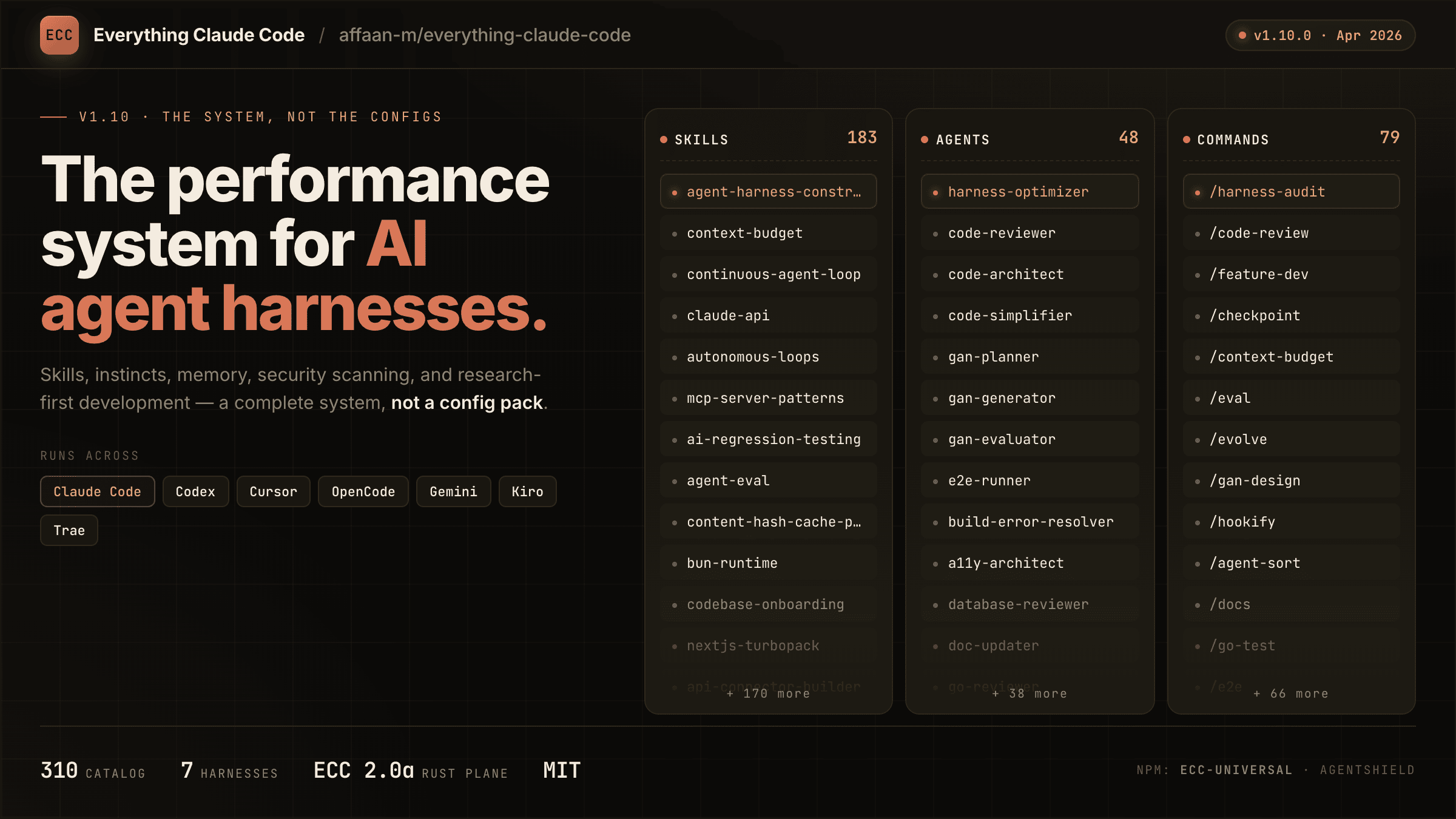
Image extracted from the official affaan-m/ECC repository, file assets/hero.png. This is a PNG image, not SVG.1
Quick summary
ECC is a workflow and configuration system for AI coding agents. The repository describes the project as a “harness-native operator system for agentic work.” In practice, it helps tools such as Claude Code, Codex, Cursor, OpenCode, Gemini, Zed and GitHub Copilot work with more structure.2
In simple terms, ECC is a pack of rules, skills, hooks, subagents, memory patterns, MCP configurations and security checks for AI-assisted software development. It helps an AI coding agent plan, write tests, review code, fix build errors, persist lessons, manage context and avoid common security mistakes.
ECC is not an AI model. It does not replace Claude, Codex, Cursor or Copilot. It is the workflow layer around them.
The problem ECC solves
Real AI coding failures often come from workflow problems: the agent starts coding without a plan, forgets project conventions, writes code without tests, accumulates noisy context, enables too many MCP tools, or runs risky commands without review.
ECC addresses these problems by packaging repeatable agent workflows: skills, commands, hooks, rules, memory persistence, continuous learning, subagents, MCP configs and security scanning.2
A simple mental model
AI coding agent
      ↓
ECC rules: always follow code, testing and security standards
      ↓
ECC skills: reusable workflows such as /plan, /tdd and /code-review
      ↓
ECC hooks: format code, run checks, remind about tmux, save memory
      ↓
ECC subagents: planner, reviewer, security reviewer, build fixer
      ↓
ECC memory: keep useful lessons across sessions
ECC is not about handing over full control. It is about giving the agent safer, more repeatable procedures.
Main parts of ECC
Skills
Skills are the most important part. The Shortform Guide describes skills as scoped workflow bundles: reusable prompts, structure, supporting files and codemaps for particular execution patterns.3
| Skill / command | When to use it |
|---|---|
/plan | Create a plan before editing |
/tdd | Use test-first development |
/code-review | Review code quality |
/build-fix | Fix build or CI failures |
/refactor-clean | Remove dead code and unnecessary files |
/security-review | Check security issues |
/test-coverage | Analyze test coverage |
Instead of typing the same long instruction every day, invoke a skill.
Commands
ECC includes slash commands, but the documentation frames commands as a compatibility layer or quick entry point. Skills are the more durable unit.3
Rules
Rules are always-follow guidance: coding style, security, testing, git workflow, performance and design patterns. The Shortform Guide describes the rules folder as a place for .md files with best practices Claude should always follow.4
Hooks
Hooks are automations that run on events. The Shortform Guide lists hook types such as PreToolUse, PostToolUse, UserPromptSubmit, Stop, PreCompact and Notification.5
Examples: remind the user to use tmux before long tests, run formatting after edits, save memory at session end, or preserve state before context compaction. Beginners should start with minimal hooks.
Subagents
Subagents are narrower agents delegated by the main orchestrator. The Shortform Guide describes them as processes that can run with limited scopes and permissions.6
| Subagent | Role |
|---|---|
| planner | breaks work into steps |
| architect | reviews system design |
| tdd-guide | guides test-first development |
| code-reviewer | reviews code quality |
| security-reviewer | checks vulnerabilities |
| build-error-resolver | fixes build failures |
| e2e-runner | runs end-to-end tests |
| doc-updater | updates documentation |
Memory and continuous learning
The Longform Guide explains that long AI sessions can suffer from context rot. ECC uses memory persistence and continuous learning patterns to save what matters across sessions.7
Useful memories include project-specific test commands, migration rules, API formats, styling constraints and repeated debugging lessons.
MCP configuration
MCP connects the agent to external services such as GitHub, Supabase, Vercel, Railway, Cloudflare and memory servers. ECC warns that too many MCP tools can reduce the usable context. The README recommends keeping under 10 MCPs enabled and under 80 tools active.8
AgentShield
ECC references AgentShield, a scanner for agent configuration. The README shows commands such as:9
npx ecc-agentshield scan
npx ecc-agentshield scan --fix
npx ecc-agentshield init
It scans CLAUDE.md, settings.json, MCP configs, hooks, agent definitions and skills.
What is inside the repository?
The README lists many directories. The most important ones are:10
| Directory / file | Meaning |
|---|---|
.claude-plugin/ | plugin and marketplace metadata |
agents/ | specialized subagents |
skills/ | workflow and domain knowledge |
commands/ | slash command compatibility |
rules/ | always-follow rules |
hooks/ | hook configs and scripts |
contexts/ | dynamic context for dev/review/research modes |
mcp-configs/ | MCP server configurations |
examples/ | example project configs |
.cursor/, .codex/, .opencode/, .vscode/ | adapters for other harnesses |
A beginner does not need to read the whole repository. Treat ECC as a toolkit for agentic coding workflows.
Installation options
Option 1: Claude Code plugin
The README recommends installing ECC as a Claude Code plugin:11
/plugin marketplace add https://github.com/affaan-m/ECC
/plugin install ecc@ecc
This gives quick access to commands, agents, skills and hooks. Important: Claude Code plugins cannot automatically distribute rules, so rules must be copied manually if you want them.12
Option 2: Minimal install, best for beginners
If you do not want global hooks yet and only want rules, agents, commands and core workflow skills, use the minimal profile:13
./install.sh --profile minimal --target claude
Windows PowerShell:
.\install.ps1 --profile minimal --target claude
Or npm:
npx ecc-install --profile minimal --target claude
The minimal profile intentionally excludes hooks-runtime, making it safer for a first install.
Option 3: Full manual install
Only use this if you intentionally skip the plugin path:
./install.sh --profile full
Windows:
.\install.ps1 --profile full
Or:
npx ecc-install --profile full
The README warns not to combine plugin install with full manual install, because this can duplicate skills and runtime behavior.14
Installing rules manually
git clone https://github.com/affaan-m/ECC.git
cd ECC
mkdir -p ~/.claude/rules/ecc
cp -r rules/common ~/.claude/rules/ecc/
cp -r rules/typescript ~/.claude/rules/ecc/   # choose your stack
This is a low-risk path if you want coding and security standards without the whole plugin/hook setup.
Using ECC with Claude Code
After plugin or minimal install, open Claude Code in your project:
claude
Type / to view commands. Good first commands:
/plan
/tdd
/code-review
/build-fix
/refactor-clean
/quality-gate
Beginner workflow:
1. /plan: ask the agent to create a plan.
2. /tdd: ask it to write or update tests.
3. Let it implement the change step by step.
4. /code-review: review what changed.
5. /quality-gate: check before commit.
Using ECC with Cursor
The README says ECC supports Cursor with hooks, rules, agents, skills, commands and MCP configs adapted to Cursor’s layout.15
./install.sh --target cursor typescript
./install.sh --target cursor python golang swift php
Windows:
.\install.ps1 --target cursor typescript
.\install.ps1 --target cursor python golang swift php
Cursor support includes events such as beforeShellExecution, afterFileEdit, beforeSubmitPrompt and beforeTabFileRead, useful for formatting, type-checking and secret blocking.16
Using ECC with Codex
The README says ECC provides first-class support for Codex App and CLI through reference configuration, an AGENTS.md supplement and shared skills.17
codex
npm install && bash scripts/sync-ecc-to-codex.sh
The sync script merges MCP servers additively and supports --dry-run for preview.17
Using ECC with OpenCode
The README says OpenCode has a strong plugin system with many event types.18
npm install -g opencode
opencode
Plugin install:
npm install ecc-universal
Add to opencode.json:
{
  "plugin": ["ecc-universal"]
}
The README notes that the npm plugin does not automatically install the full command/agent/instruction catalog.18
Using ECC with GitHub Copilot in VS Code
ECC also supports GitHub Copilot through native VS Code/Copilot files. The README explains that Copilot reads:19
.github/copilot-instructions.mdfor always-on repository instructions;.github/prompts/*.prompt.mdfor reusable prompts such asplan,tddandcode-review.
Limitation: Copilot does not have a hook system or subagent API, so ECC hook automation and subagent delegation are unavailable in Copilot.20
When should you use ECC?
Use ECC if you use Claude Code, Codex, Cursor or OpenCode often; want AI coding work to follow a process; need workflows for planning, TDD, review and build fixes; want cross-session memory; or want better security checks around agent config.
Do not start with the full setup if you are new to AI coding agents, do not understand hooks yet, do not want local scripts to run automatically, or work in an environment with sensitive production credentials.
Individual rollout plan
Day 1: Install plugin or minimal profile.
Day 2: Try /plan, /code-review and /build-fix.
Day 3: Add rules for your main stack.
Day 4: Enable one or two light hooks only if needed.
Day 5: Run AgentShield.
Day 6-7: Keep only workflows that actually saved time.
Team rollout plan
Start with a small pilot, standardize only the rules you actually need, choose a few useful skills first, control MCP usage, and add security scanning before broad rollout. The README warning about keeping MCPs limited is important because context window capacity can drop when too many tools are enabled.8
Security notes
ECC’s SECURITY.md says not to commit real credentials, not to hard-code PATs/API keys/OAuth tokens in mcpServers[*].env, and to rotate secrets plus rewrite history if a secret is committed.21
Short checklist:
- Do not commit
~/.claude/settings.jsonif it contains secrets. - Do not paste real tokens into sample MCP configs.
- Verify local MCP ports before using them.22
- Run AgentShield periodically.
- Do not enable hooks you do not understand.
- Do not let the agent deploy production without approval.
- Do not enable too many MCP tools.
- Review all agent changes before committing.
Troubleshooting
TROUBLESHOOTING.md covers common issues such as context overflow, missing agents, hooks not firing, Node/Python problems, plugin loading errors, package manager detection issues and slow performance.23
Useful checks:
claude --version
node --version
python3 --version
npm --version
ls -la ~/.claude/plugins/cache/
find ~/.claude/plugins -name "*.sh" -exec chmod +x {} \;
npx ecc-agentshield scan
ECC vs Headroom, RTK and Hermes Agent
| Tool | Main goal | Simple explanation |
|---|---|---|
| ECC | Standardize AI coding workflows | Skills, hooks, rules and subagents for coding agents |
| Headroom | Compress LLM context | Reduce tokens for long tool/RAG output |
| RTK | Compress dev CLI output | Wrap git, tests, lint and logs for coding agents |
| Hermes Agent | Long-running agent runtime | Agent with memory, skills, gateway and terminal backend |
ECC is closest to an “agentic coding operations system.” It shapes how the agent works.
FAQ
What is ECC?
ECC is an AI coding agent workflow system with skills, commands, hooks, rules, subagents, memory patterns, MCP configs and security scanning. The repository describes it as a harness-native operator system for agentic work.2
Is ECC only for Claude Code?
No. The README says ECC works across Codex, Claude Code, Cursor, OpenCode, Gemini, Zed, GitHub Copilot and other AI agent harnesses.2
What should beginners install?
Start with the plugin or minimal profile. Do not install the full profile until you understand hooks and runtime behavior.
Does ECC make the AI model smarter?
No. ECC does not improve the model itself. It gives the model better workflow structure, rules, skills and checks.
Is ECC risky?
It can be if you enable hooks, MCP configs or scripts without review. Use the minimal profile first, avoid committing secrets and run AgentShield.
Conclusion
affaan-m/ecc is a large repository, but the core idea is simple: turn AI coding from improvised chat into a structured workflow. It provides skills for repeatable tasks, rules for project standards, hooks for automation, subagents for delegation, memory for learned context and AgentShield for security checks.
The best way to adopt ECC is to start small: install the plugin or minimal profile, try /plan, /code-review and /build-fix, add stack-specific rules, and only then decide whether hooks, MCPs and team-wide setup are worth it. Do not enable every component just because it exists.
References
Footnotes
-
GitHub raw asset.
affaan-m/ECC/assets/hero.png. https://raw.githubusercontent.com/affaan-m/ECC/main/assets/hero.png ↩ -
GitHub / README.
affaan-m/ECC. https://github.com/affaan-m/ecc ↩ ↩2 ↩3 ↩4 -
the-shortform-guide.md, “Skills and Commands”. https://raw.githubusercontent.com/affaan-m/ecc/main/the-shortform-guide.md ↩ ↩2 -
the-shortform-guide.md, “Rules and Memory”. https://raw.githubusercontent.com/affaan-m/ecc/main/the-shortform-guide.md ↩ -
the-shortform-guide.md, “Hooks”. https://raw.githubusercontent.com/affaan-m/ecc/main/the-shortform-guide.md ↩ -
the-shortform-guide.md, “Subagents”. https://raw.githubusercontent.com/affaan-m/ecc/main/the-shortform-guide.md ↩ -
the-longform-guide.md, “Context and Memory Management” and “Continuous Learning / Memory”. https://raw.githubusercontent.com/affaan-m/ecc/main/the-longform-guide.md ↩ -
README context-window note about MCP count and enabled tools. https://raw.githubusercontent.com/affaan-m/ecc/main/README.md ↩ ↩2
-
README AgentShield section. https://raw.githubusercontent.com/affaan-m/ecc/main/README.md ↩
-
GitHub README, repository structure and component tree. https://raw.githubusercontent.com/affaan-m/ecc/main/README.md ↩
-
README Installation, “Install as Plugin”. https://raw.githubusercontent.com/affaan-m/ecc/main/README.md ↩
-
README Installation note about plugin rules limitation. https://raw.githubusercontent.com/affaan-m/ecc/main/README.md ↩
-
README Quick Start, low-context/no-hooks path. https://raw.githubusercontent.com/affaan-m/ecc/main/README.md ↩
-
README warning about not mixing plugin and full installer. https://raw.githubusercontent.com/affaan-m/ecc/main/README.md ↩
-
README Cursor IDE Support. https://raw.githubusercontent.com/affaan-m/ecc/main/README.md ↩
-
README Cursor hook events and scripts. https://raw.githubusercontent.com/affaan-m/ecc/main/README.md ↩
-
README Codex App + CLI Support. https://raw.githubusercontent.com/affaan-m/ecc/main/README.md ↩ ↩2
-
README OpenCode Support. https://raw.githubusercontent.com/affaan-m/ecc/main/README.md ↩ ↩2
-
README GitHub Copilot Support. https://raw.githubusercontent.com/affaan-m/ecc/main/README.md ↩
-
README GitHub Copilot limitations. https://raw.githubusercontent.com/affaan-m/ecc/main/README.md ↩
-
SECURITY.md, secrets handling guidance. https://raw.githubusercontent.com/affaan-m/ecc/main/SECURITY.md ↩ -
SECURITY.md, local MCP port guidance. https://raw.githubusercontent.com/affaan-m/ecc/main/SECURITY.md ↩ -
TROUBLESHOOTING.md. https://raw.githubusercontent.com/affaan-m/ecc/main/TROUBLESHOOTING.md ↩
Written by PixelRouter Editorial Team
We publish deep, authoritative guides on AI infrastructure, API gateway security, cloud financial management, and system optimizations for developers.
FAQ
What is ECC?
ECC is an AI coding agent workflow system with skills, commands, hooks, rules, subagents, memory patterns, MCP configurations and security scanning. The article describes it as a workflow layer around tools such as Claude Code, Codex, Cursor, OpenCode and GitHub Copilot, not as an AI model.
Is ECC only for Claude Code?
No. The article says ECC supports multiple AI coding agent harnesses, including Claude Code, Codex, Cursor, OpenCode, Gemini, Zed and GitHub Copilot, with different levels of support depending on the tool.
What should beginners install first?
The article recommends starting with the Claude Code plugin or the minimal profile. Beginners should avoid the full setup until they understand hooks and runtime behavior.
Does ECC make an AI model smarter?
No. ECC does not improve the model itself. It provides workflow structure, rules, skills, checks and automation around the model.
What are the main safety points when using ECC?
The article advises users not to enable hooks they do not understand, avoid committing secrets, review MCP configurations, run AgentShield periodically, limit MCP tools and review agent changes before committing.
📂Related posts
AI Guides
What Is 9Remote? Remote Terminal, Desktop, Files, and AI Coding from Your Phone
A simple guide to decolua/9remote: how it lets developers access a host terminal, remote desktop, file explorer, local sites, and AI coding tools from a phone or browser with QR pairing and Cloudflare tunnel support.
AI Guides
What Is 9Router? A Simple Guide to AI Coding Provider Routing
A practical guide to decolua/9router, an open-source AI router and proxy for AI coding tools with OpenAI-compatible endpoints, provider routing, fallback combos, RTK token saving, dashboard setup, Docker deployment, and security notes.
AI Guides
What Is OmniVoice? A Simple Guide to Multilingual TTS and Voice Cloning
A beginner-friendly guide to k2-fsa/OmniVoice, covering multilingual zero-shot text-to-speech, voice cloning, voice design, installation, Python and CLI usage, batch inference, deployment patterns, and voice-safety notes.