AI Guides
What Is CanIRun.ai? A Browser-Based Tool for Checking Whether Your PC Can Run Local AI Models
CanIRun.ai is a website that helps users quickly estimate which local AI models their computer can run. Instead of manually comparing GPU, VRAM, RAM, CPU cores, memory bandwidth, and model requirements, users open the website and let the browser detect their hardware.
💡Key Takeaways
- CanIRun.ai is a website that helps users quickly estimate which local AI models their computer can run.
- Instead of manually comparing GPU, VRAM, RAM, CPU cores, memory bandwidth, and model requirements, users open the website and let the browser detect their hardware.
CanIRun.ai is a website that helps users quickly estimate which local AI models their computer can run. Instead of manually comparing GPU, VRAM, RAM, CPU cores, memory bandwidth, and model requirements, users open the website and let the browser detect their hardware. The site then displays model compatibility with intuitive labels such as runs great, runs well, decent, tight fit, barely runs, or too heavy.
The official CanIRun.ai homepage describes its purpose as helping users “find out which AI models your machine can actually run.” The same page also warns that the results are estimates based on browser APIs and that actual specs may vary.
Sources: CanIRun.ai homepage, CanIRun.ai Why.
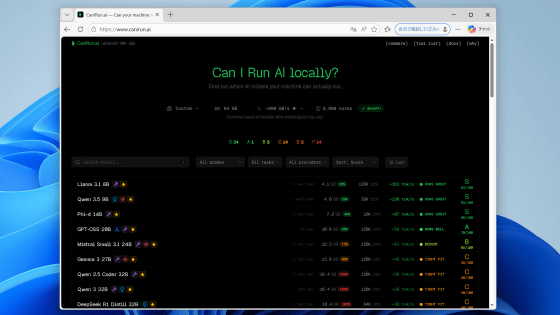
Image source: GIGAZINE, “CanIRun.ai is a handy website that lets you instantly find out which local AI programs can run on your PC,” published March 16, 2026.
Direct image URL: https://i.gzn.jp/img/2026/03/16/pc-ai-run/00_m.png
Source article: https://gigazine.net/gsc_news/en/20260316-pc-ai-run/
Usage note: This is a screenshot published by GIGAZINE in its review. For commercial republishing, cover images, or advertising use, review the image-use terms of the original source.
Quick Summary
CanIRun.ai is useful for beginners who want to run AI models locally but do not yet know what their machine can handle. It is especially relevant for people considering tools such as Ollama, LM Studio, llama.cpp, Jan, or other local LLM runtimes.
Its main advantage is zero-install hardware detection. According to the official “Why” page, CanIRun.ai runs entirely in the browser, detects GPU, CPU, and memory, calculates model fit client-side, and does not send data to a server. However, the same page clearly states that the results are estimates because browser APIs expose only limited hardware information.
Source: CanIRun.ai Why.
What Problem Does CanIRun.ai Solve?
Before running local AI, users usually face four practical questions:
- Does my GPU have enough VRAM to load the model?
- If the model loads, will generation speed be usable?
- Should I use a 3B, 7B, 14B, 32B, 70B, or larger model?
- Which quantization should I choose: Q4, Q6, Q8, or F16?
These questions are difficult for beginners because they require understanding parameters, VRAM, quantization, context length, memory bandwidth, dense versus MoE architecture, and tokens per second. CanIRun.ai converts those concepts into a visual compatibility table.
The official docs explain that labels such as 7B or 70B refer to billions of parameters. Larger models are generally more capable but need more memory and run more slowly. The docs also explain quantization as reducing the precision of model weights to make models smaller and faster, at the cost of some quality.
Source: CanIRun.ai Docs.
How CanIRun.ai Works
According to its “Why” page, CanIRun.ai uses three groups of browser signals to detect hardware:
- WebGL to identify the GPU name and vendor through
WEBGL_debug_renderer_info. - WebGPU to request adapter details when supported by the browser.
navigator.hardwareConcurrencyfor CPU core count,navigator.deviceMemoryfor approximate RAM, and a short CPU micro-benchmark for single-core performance.
The site then matches the detected GPU against its built-in hardware database, which includes NVIDIA, AMD, Intel, and Apple Silicon entries. Each database entry includes VRAM capacity and memory bandwidth, two of the most important values for running AI models locally.
Source: CanIRun.ai Why.
There is a key caveat: browser-exposed hardware data is not perfectly accurate. MDN explains that navigator.deviceMemory returns an approximate memory value and is deliberately rounded and clamped to reduce fingerprinting risks. As a result, a mismatch between what CanIRun.ai shows and your actual RAM/VRAM does not necessarily mean the site is broken; it may reflect browser API limitations.
Source: MDN Navigator.deviceMemory.
How the Site Decides Whether a Model Fits
CanIRun.ai estimates VRAM requirements using a simple formula: parameters × bits per weight, plus runtime overhead, KV cache, and safety margin. The “Why” page gives an example where a 70B model at Q4_K_M needs roughly 39 GB after accounting for overhead.
Its 0–100 score combines three factors:
- Estimated generation speed, weighted around 55%.
- Memory headroom, weighted around 35%.
- A small quality bonus for larger models, around 10%.
The final score is mapped to a grade. For discrete GPUs, a model is considered runnable if it uses no more than roughly 85% of VRAM. Apple Silicon uses a different threshold based on unified memory.
Source: CanIRun.ai Why.
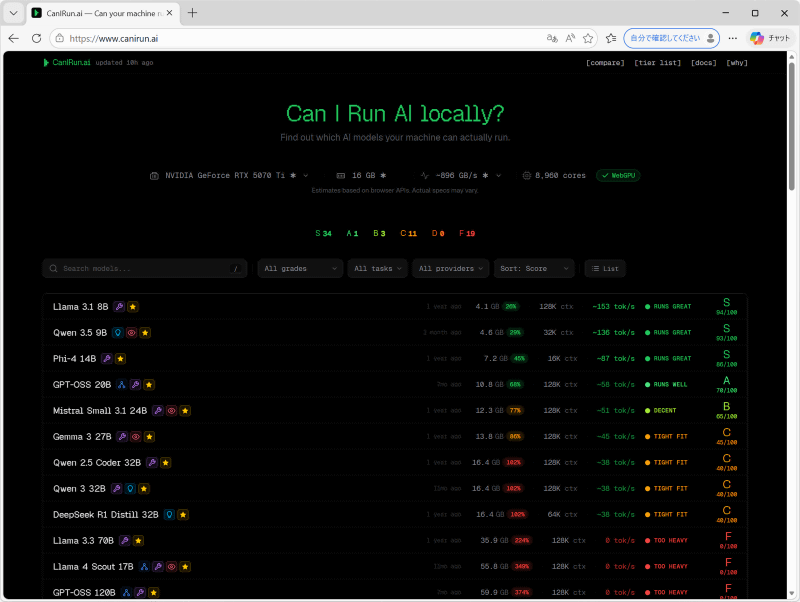
Image source: GIGAZINE review of CanIRun.ai, published March 16, 2026.
Direct image URL: https://i.gzn.jp/img/2026/03/16/pc-ai-run/02_m.png
Source article: https://gigazine.net/gsc_news/en/20260316-pc-ai-run/
What the image shows: CanIRun.ai’s model table with estimated VRAM, tokens per second, and S–F compatibility grades.
Main Features
Based on the homepage, Compare page, Tier List page, and GitHub README, CanIRun.ai includes these notable features:
- Browser-based hardware detection without installing a native app.
- Filters by task, including chat, code, reasoning, and vision.
- Filters by provider or model family, including Meta, Google, Alibaba, DeepSeek, Mistral, Microsoft, NVIDIA, OpenAI, Qwen, and others.
- Multiple quantization levels per model, such as Q2_K, Q4_K_M, Q6_K, Q8_0, and F16.
- Estimated tokens per second derived from memory bandwidth and model footprint.
- A Tier List page that ranks models from S to F.
- A Compare page for comparing two devices or GPUs.
- A public GitHub repository under the MIT license.
Sources: CanIRun.ai homepage, CanIRun.ai Compare, CanIRun.ai Tier, GitHub midudev/canirun.ai.
Why the Tool Is Useful
CanIRun.ai lowers the entry barrier for local AI. A beginner does not need to immediately understand VRAM, quantization, or memory bandwidth. The site gives them a practical starting point: small model, medium model, or hardware upgrade.
For general users, it helps avoid a common mistake: downloading a model that is too large for the machine. A laptop with 8–16 GB RAM may handle small 1B–3B models or some quantized 7B models, but it will struggle with 32B, 70B, or larger models. For developers, it can help quickly select a local coding or summarization model for offline experiments.
For buyers comparing GPUs or Macs, the Compare page can act as a preliminary upgrade simulator. GIGAZINE also described the comparison feature as useful when considering a new graphics card.
Sources: GIGAZINE, CanIRun.ai Compare.
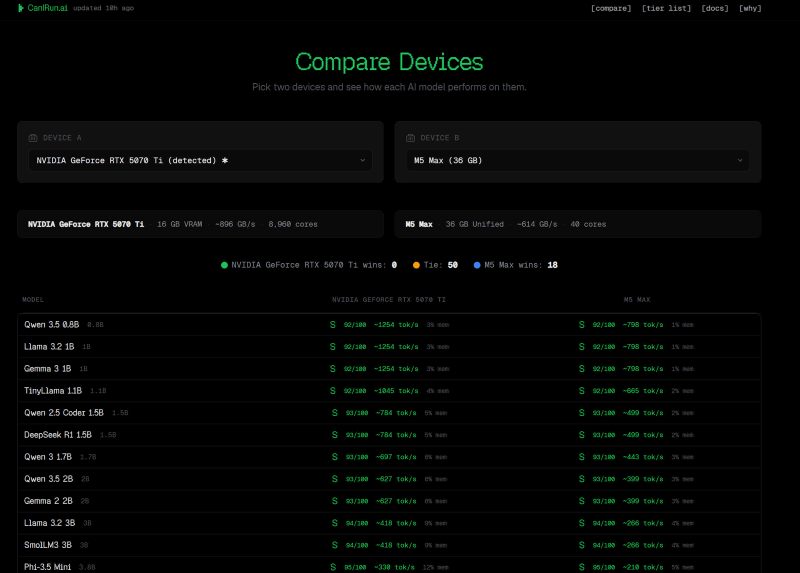
Image source: GIGAZINE review of CanIRun.ai, published March 16, 2026.
Direct image URL: https://i.gzn.jp/img/2026/03/16/pc-ai-run/06_m.png
Source article: https://gigazine.net/gsc_news/en/20260316-pc-ai-run/
What the image shows: CanIRun.ai’s Compare Devices page for comparing two devices or GPUs by local AI model compatibility.
The Results Are Not Absolute Benchmarks
CanIRun.ai scores are estimates, not real benchmarks run on your machine. The website itself warns that browser APIs provide limited hardware data, GPU names may be vague, RAM values are approximate, and bandwidth numbers are based on spec sheets rather than direct measurement.
Real-world performance also depends on factors the browser cannot measure: drivers, OS memory pressure, thermal throttling, background processes, inference engine, batch size, context length, quantization format, and GPU/CPU offloading strategy.
Source: CanIRun.ai Why.
Technical discussions on Hacker News also raised concerns about possible inaccuracies, including confusion between full-precision and quantized model sizes, first-token speed versus sustained generation, and missing hardware/model entries. This does not make the tool useless; it means it should be treated as a first-pass filter, followed by real testing in Ollama, LM Studio, llama.cpp, or your own deployment stack.
Source: Hacker News discussion.
Privacy Perspective
CanIRun.ai states that hardware detection and model matching run client-side and that no data is sent to a server. That is a positive design choice compared with tools that require installing an app or uploading hardware reports.
Source: CanIRun.ai Why.
Still, the privacy model should be understood clearly. WebGL, WebGPU, deviceMemory, and hardwareConcurrency are hardware signals that can contribute to browser fingerprinting when abused by websites. MDN defines browser fingerprinting as the practice of using browser APIs to collect device/browser configuration data and build a digital fingerprint. With CanIRun.ai, the main privacy consideration is not password theft or file access, but exposure of hardware characteristics required for the tool to work.
Sources: MDN browser fingerprinting overview, CanIRun.ai Why.
Practical recommendations:
- Use the official domain:
https://www.canirun.ai/. - Do not enter passwords, API keys, personal data, or project secrets into hardware-checking websites.
- Review the public GitHub repository if you need extra confidence.
- Treat the score as guidance, not a guarantee.
- After choosing a model, test it locally with Ollama, LM Studio, llama.cpp, or your runtime of choice.
Who Should Use CanIRun.ai?
CanIRun.ai is most useful for four groups.
First, beginners who want to run local AI but do not know which model to start with. Second, developers who need a quick offline model for experiments, summarization, local coding, or internal agents. Third, users considering a new GPU, MacBook, Mac Studio, or workstation for AI. Fourth, educators and content creators who need a simple visual way to explain hardware requirements for local LLMs.
It is less suitable as the only source for production benchmarking, long-term cost analysis, or task-specific model quality evaluation. For those cases, you still need to benchmark your actual workload.
CanIRun.ai vs Real Benchmarking
CanIRun.ai is best for first-pass exploration: quick, free, zero-install, and easy to understand. Real benchmarking is best for final decisions: deployment, GPU purchase decisions, production latency estimates, or choosing a model for a specific application.
The strongest workflow is to use both. Use CanIRun.ai to eliminate models that are clearly too heavy, then verify speed, memory use, output quality, and stability with your own workload.
Conclusion
CanIRun.ai is a useful tool in the local AI ecosystem because it turns the difficult question “Can my machine run this model?” into an understandable compatibility table. It is especially helpful for beginners, developers experimenting with offline AI, and buyers comparing hardware.
However, its output is still an estimate based on browser APIs and a curated hardware/model database. For serious decisions—especially buying expensive hardware or deploying local AI into real work—use CanIRun.ai as a starting filter, then validate with real benchmarks.
SEO Title Ideas
- What Is CanIRun.ai? Check Whether Your PC Can Run Local AI Models
- How to Check If Your PC Can Run Llama, Qwen, DeepSeek, or Gemma
- CanIRun.ai Review: A Browser Tool for Local AI Hardware Compatibility
- Should You Use CanIRun.ai Before Buying a GPU for Local AI?
- CanIRun.ai Guide for Beginners Running LLMs Locally
SEO/GEO Keywords
CanIRun.ai, can i run ai locally, local AI, local LLM, AI hardware checker, GPU for AI, VRAM checker, Ollama, LM Studio, llama.cpp, WebGPU, WebGL, quantization, Q4_K_M, Llama 3.1, Qwen, Gemma, DeepSeek, GPT-OSS, offline AI models.
FAQ
Is CanIRun.ai free?
The website can be opened directly in the browser, and its GitHub repository is public. The GitHub README lists the project under the MIT license.
Source: GitHub midudev/canirun.ai.
Does CanIRun.ai send my hardware data to a server?
According to the official “Why” page, hardware detection and calculations happen client-side and no data is sent to a server. This is the site’s own claim; cautious users can inspect the public GitHub repository.
Sources: CanIRun.ai Why, GitHub.
Why can the results differ from real performance?
Because the browser cannot measure everything directly. RAM may be rounded, GPU names may be incomplete, bandwidth may come from spec sheets, and actual performance depends on drivers, thermals, inference engine, context length, and quantization.
Sources: CanIRun.ai Why, MDN Navigator.deviceMemory.
Should I rely on CanIRun.ai when buying a GPU?
Use it as an initial reference, not as your only source. Before purchasing expensive hardware, check real benchmarks using the specific models and workloads you plan to run.
Does CanIRun.ai replace Ollama or LM Studio?
No. CanIRun.ai estimates compatibility. To actually run the models, you still need tools such as Ollama, LM Studio, llama.cpp, Jan, or another local inference runtime.
Illustration Image Sources
| Image | Direct image URL | Source page | Note |
|---|---|---|---|
| CanIRun.ai main interface | https://i.gzn.jp/img/2026/03/16/pc-ai-run/00_m.png | https://gigazine.net/gsc_news/en/20260316-pc-ai-run/ | Screenshot published in GIGAZINE’s CanIRun.ai review on March 16, 2026. |
| S–F model grading table | https://i.gzn.jp/img/2026/03/16/pc-ai-run/02_m.png | https://gigazine.net/gsc_news/en/20260316-pc-ai-run/ | Illustrates how CanIRun.ai grades local AI model compatibility by hardware configuration. |
| Compare Devices page | https://i.gzn.jp/img/2026/03/16/pc-ai-run/06_m.png | https://gigazine.net/gsc_news/en/20260316-pc-ai-run/ | Illustrates the device/GPU comparison feature. |
Note: These images are screenshots published by GIGAZINE in its review article. This Markdown file cites the original source and embeds the direct image URL for illustration. For commercial reuse, cover images, or advertising, check the original source’s image-use terms.
References
- CanIRun.ai homepage: https://www.canirun.ai/
- CanIRun.ai Why: https://www.canirun.ai/why/
- CanIRun.ai Docs: https://www.canirun.ai/docs/
- CanIRun.ai Compare: https://www.canirun.ai/compare/
- CanIRun.ai Tier List: https://www.canirun.ai/tier/
- GitHub repository: https://github.com/midudev/canirun.ai
- GIGAZINE review and screenshots: https://gigazine.net/gsc_news/en/20260316-pc-ai-run/
- MDN Navigator.deviceMemory: https://developer.mozilla.org/en-US/docs/Web/API/Navigator/deviceMemory
- MDN browser fingerprinting overview: https://developer.mozilla.org/en-US/docs/Mozilla/Add-ons/WebExtensions/API/privacy/websites
- Hacker News discussion: https://news.ycombinator.com/item?id=47363754
Image note: The file now uses standard Markdown image syntax
and includes a dedicated image-source table to avoid broken internal image citations or unclear source attribution.
Written by PixelRouter Editorial Team
We publish deep, authoritative guides on AI infrastructure, API gateway security, cloud financial management, and system optimizations for developers.
FAQ
Is CanIRun.ai free?
The website can be opened directly in the browser, and its GitHub repository is public. The GitHub README lists the project under the MIT license.
Does CanIRun.ai send my hardware data to a server?
According to the official “Why” page, hardware detection and calculations happen client‑side and no data is sent to a server. This is the site’s own claim; cautious users can inspect the public GitHub repository.
Why can the results differ from real performance?
Because the browser cannot measure everything directly. RAM may be rounded, GPU names may be incomplete, bandwidth numbers come from spec sheets, and actual performance depends on drivers, thermals, the inference engine, context length, and quantization.
Should I rely on CanIRun.ai when buying a GPU?
Use it as an initial reference, not as your only source. Before purchasing expensive hardware, check real benchmarks using the specific models and workloads you plan to run.
Does CanIRun.ai replace Ollama or LM Studio?
No. CanIRun.ai estimates compatibility. To actually run the models, you still need tools such as Ollama, LM Studio, llama.cpp, Jan, or another local inference runtime.
📂Related posts
AI Guides
AI Coding Agents Are Moving Beyond Code: The Visual Feedback Loop for iOS Development
An accessible analysis of visual feedback loops for iOS coding agents: editing Swift and SwiftUI, building apps, running iOS Simulator, observing the interface, hot reloading changes, attaching feedback to UI elements, and revising code.
AI Guides
What Is blind-watermark? A Beginner-Friendly Guide to guofei9987/blind_watermark
A beginner-friendly guide to guofei9987/blind_watermark: what invisible watermarking is, how DWT–DCT–SVD works, Python and CLI usage, text/image watermark modes, crop and compression robustness, security limitations, privacy considerations, and the MIT License.
AI Guides
What Is Orb.Farm? Browser-Based Aquatic Ecosystem Simulation
Learn what Orb.Farm is, how browser-based aquatic ecosystem simulation works, and what it teaches about algae, daphnia, fish, oxygen, CO₂, and ecological balance.